Making of: how I make 3D videos with nothing but code and AI agents
11 min read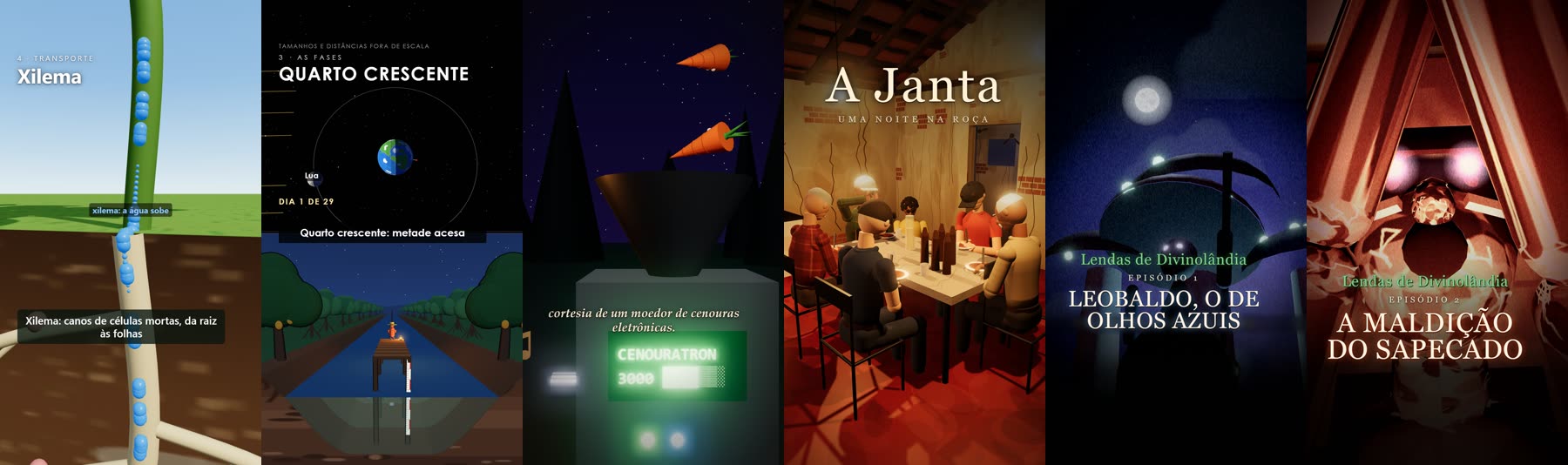
Over the last few days I made a series of short videos:
- one about photosynthesis;
- one about the phases of the Moon;
- a surreal fable about a knight made of cloth paper;
- a poem about a dinner at a farmhouse;
- two episodes of a mockumentary called Lendas de Divinolândia ("Legends of Divinolândia").
All of them have 3D sets, characters, camera work, narration, subtitles and a soundtrack.
None of them was generated by a video model like Sora or Veo. And I never opened Blender, a video editor or a music app.
It's all code: every tree, every character, every camera move, every note of the score. The code is written by an AI agent (Claude Code). I play the director: I write or describe the idea, look at the previews and ask for changes.
This post is the making of that process, with the technical parts and with other projects doing similar things.
How this differs from the usual "AI video"
When people talk about AI video, it's almost always a model that generates pixels: you write a prompt and get a finished clip. It works, but you control almost nothing. The character's face changes from one shot to the next, you can't move the camera half a meter to the left, and every tweak is a new roll of the dice.
What I do goes the other way: the AI doesn't generate the video, it generates the program that draws the video. That changes everything:
- Everything is editable. "The capybara looks like a pink blob" becomes a change to geometry and lighting, not a new prompt and a prayer.
- Everything is consistent. Leobaldo in episode 1 is the same 3D object in episode 2.
- Everything is deterministic. Rendering twice produces exactly the same video, frame by frame.
The price is the look: low-poly scenes, closer to a game than to a film. For the stories I want to tell, that's a feature.
How each video is organized
Each video is a folder with a handful of files:
| File | What it does |
|---|---|
narracao.json |
The script: every line with its text, subtitle, pause and which voice speaks it |
cena.js |
The 3D scene in three.js, with sets, characters and cameras |
musica.mjs |
The score and sound effects, synthesized sample by sample |
capa.mjs |
Generates the 1080×1920 cover used on social media |
post.json |
Title, caption and hashtags for publishing |
Plus a few shared scripts: voz.mjs generates the narration, and render.mjs records the frames and builds the MP4.
To give a sense of scale: the cena.js for episode 2 of Lendas is 1,657 lines and the score is 272. I didn't write any of them.
1. The script drives everything
It all starts in narracao.json. A real excerpt from episode 2:
"voz": {
  "motor": "omnivoice",
  "design": "male, middle-aged, low pitch",
  "speed": 1.05
},
"vozes": {
  "bruxa": { "design": "female, elderly, low pitch", "speed": 0.95 }
},
"falas": [
  { "id": "s1", "texto": "Divinolândia. Uma pequena cidade no alto da serra, no interior de São Paulo.", "pausa": 0.3 },
  ...
]
The order of the pipeline matters: voice first, picture second. The real length of each recorded line defines the video's timeline. The scene and the music are built on top of that timeline, not the other way around. That way the camera reaches the church exactly when the narrator says "church".
2. The voice: designed, cloned and checked by another AI
The narration runs locally on my graphics card (an RTX 3060 with 6 GB) using OmniVoice, an open voice model.
The process has three steps:
- Design the voice. Instead of cloning someone's voice, I describe one:
"male, middle-aged, low pitch". The model creates a voice from the description, and it becomes the video's reference. - Clone that voice for every line. The narrator sounds the same from start to finish, and across episodes (episode 2 reuses episode 1's reference).
- Record up to three takes and keep the best. A speech recognizer transcribes each take, and the script keeps the one that matches the text most faithfully. It's automatic quality control: if the model swallowed a word, that take loses.
There are dubbing tricks too. The priest in episode 2 drives a "Uno Mille Fire" (an old Fiat), and the model read it strangely. The fix was to write the line phonetically and keep the correct spelling in a separate legenda (subtitle) field.
3. The picture: offline rendering, frame by frame
This is the part that makes everything deterministic. The scene does not run in real time while something records the screen. It exposes a single function:
window.__frame = function (t) {
  // place everything exactly where it should be at second t
};
render.mjs opens the page in a headless Chromium (via Playwright, with the GPU enabled) and runs a simple loop:
for (let i = 0; i < TOTAL * FPS; i++) {
  await page.evaluate(t => window.__frame(t), i / FPS);
  await page.screenshot({ path: `quadros/${i}.jpg`, quality: 93 });
}
A 2:59 video at 30 fps is 5,370 frames. If the scene is heavy and the computer can only draw 5 frames per second, that's fine: each frame takes as long as it needs, and the final video plays smoothly. It's the same principle behind any animation renderer, from Blender to Pixar. On the web, the classic reference for this idea is CCapture.js, which freezes the browser's clock to capture a canvas frame by frame.
At the end, ffmpeg combines the frames with the audio (H.264, CRF 19).
How the AI "sees" what it made
The agent can't watch a video, but it can read images. So the review loop is:
- render just a few moments (
--t=3,9,21); - build a contact sheet, a grid with one frame from each shot;
- look at the sheet and fix what's wrong.
That's how problems like these were found and fixed:
- the camera inside a wall;
- a character's hand covering his face while smoking a corn-husk cigarette;
- dinosaurs too small on the horizon;
- a witch hidden inside the hut.
Some problems needed real math. The camera, smoothed with Hermite curves, overshot on large jumps; switching to Fritsch–Butland monotone interpolation fixed it.
4. The music: no recorded audio
There are no samples and no stock music. The score is synthesized sample by sample, 48,000 numbers per second, in plain JavaScript:
- an FM-synthesis electric piano;
- strings for the phases of the Moon, in a "Kubrick" mood;
- a music-box waltz with pizzicato for the knight;
- for the witch's curse in episode 2, industrial percussion of rusty pipes and sheet metal, a saturated drone and a siren, in the spirit of the Silent Hill soundtrack.
Since the music also reads the timeline, the accents land in the right places. The bell rings when the narration mentions the bell, and the music cuts a quarter of a second before the jumpscare so the scare hits harder. The random number generator uses a fixed seed, so the score is deterministic too.
5. Lendas de Divinolândia: filming inside a game
The two Lendas episodes have one extra ingredient. I have a game, Divino City, a playable version of my hometown, Divinolândia, rebuilt from OpenStreetMap and satellite imagery. Instead of building the town again, the episodes are filmed inside the game.
The game has development hooks that let an external script control the clock and draw one frame at a time. cena.js is injected into the game page and adds everything the town doesn't have:
- Leobaldo and the gnomes;
- the priest and his car;
- the crowd in front of the main church;
- the giant capybara.
Whatever doesn't fit in the town (the 1850 valley with the drovers' hut, outer space, the inside of the bell tower) goes onto a stage: a second 3D renderer, on a canvas above the game, that comes and goes on camera cuts.
The neighborhood lake, which didn't exist in the game, was rebuilt from its real OpenStreetMap outline, with the trees of the grove next to it placed from the satellite image.
This has an old name: machinima, using a game engine as a film studio. It's what Red vs. Blue did inside Halo back in 2003 (Wikipedia). The difference is that here the game, the cameras and the actors were written by AI too.
The memory problem
Episode 2 almost didn't get recorded. Capturing thousands of frames from the game's development server piled up memory until the system killed the process.
The fix had three parts:
- record from the game's production build, served by a minimal static server;
- render in batches of 900 frames, with a fresh browser for each batch;
- wait for memory to drop between batches, and resume from where it stopped if anything fails.
Besides not crashing anymore, it got about four times faster: a whole episode now records in under half an hour.
6. Format, cover and publishing
Some rules became agent skills, instruction files the agent loads whenever the topic comes up, so I don't have to repeat myself:
- Format: every video is vertical, 9:16, 1080×1920, for TikTok, Reels and Shorts. Text stays out of the areas covered by the apps' interface (top, bottom and the button column on the right).
- Length: at most 2:59. That's a ceiling, not a target.
- Cover: every video gets its own cover, generated by code (an HTML page with the best frame of the video and the title, photographed by the browser).
Publishing is done by the agent too, in my own Chrome, through the Claude extension. The extension only uploads files up to 10 MB, and these videos are 300 to 700 MB. So:
- the video is split into 9.4 MB chunks;
- each chunk is uploaded to a hidden file input on the page;
- the video is reassembled inside the browser, checked byte by byte, and handed to YouTube, TikTok and Instagram as if I had dragged the file in.
A lesson learned today: on TikTok, the cover has to be uploaded before publishing, because afterwards it only lets you pick a frame from the video. Both episodes went out without a cover and had to be deleted and posted again. That became a rule in the skill as well.
The episodes are live (in Portuguese):
- Lendas de Divinolândia, ep. 1: YouTube · TikTok
- Lendas de Divinolândia, ep. 2: YouTube · TikTok · Instagram
- A Janta: YouTube
Does this have a name?
I went looking for who else does this and what they call it. There's no single name yet, but three terms keep showing up:
- Programmatic video: the most common term. It comes from Remotion, a framework for making videos with React. It has become the most popular way for agents to make video, and Remotion itself publishes skills for Claude Code.
- Code-to-video: the name used in academic research. Code2Video, from Show Lab at the National University of Singapore, uses three agents: one plans the lesson, another writes the animation code, and a third looks at the rendered frames and fixes the layout. That's almost exactly my contact-sheet loop. Along the same lines are Manimator, which turns research papers into animations, and a pedagogical pipeline with narration and human review. These projects use Manim, the library created by 3Blue1Brown.
- Vibe motion or vibe animation: the nickname of the moment, borrowed from vibe coding. You describe it, and the AI writes the animation code.
The project closest to my pipeline is HyperFrames, which HeyGen open-sourced this year. It's a framework that turns an HTML page into an MP4 deterministically, with Chrome and ffmpeg, built to be driven by AI agents, and it even has an adapter for three.js scenes. In essence it's the render.mjs the agent and I wrote, packaged as a product.
What I haven't found often is the full package: entire 3D worlds with characters, an original voice, a synthesized score and a script, all written by AI. Most examples are motion graphics (animated text, charts and logos) or 2D lessons. If I had to name what I do, I'd call it AI-coded 3D programmatic video. And the Lendas episodes are still machinima.
What I take from this
What impresses me most isn't the quality of any single video, it's the loop. An idea I have in the morning becomes a three-minute video, with sets, voice and music, the same day. When something looks bad, I say what looks bad, and the fix is a change in code, not a new gamble.
I wrote here before that, for the first time, I can create at the speed of my ideas. These videos are the clearest example of that I've made so far. A week ago I didn't know how to make any of them.